It’s often said that a major discrepancy between estimated and actual row counts in a query’s execution plan is a sign of inaccurate statistics or a poor cardinality estimate and that it’s a sign of a problem. This is generally true, however there are places where the estimates and actual rows will differ, often quite dramatically, without it been a problem. The reason for this is that these two values show slightly different things.
Let’s take a look at an example. (table creation code at the end of the post)
select bt.id, bt.SomeColumn, st.SomeArbDate
from dbo.BigTable bt
inner join dbo.SmallerTable st on bt.SomeColumn = st.LookupColumn
where bt.id between 5000 and 5100
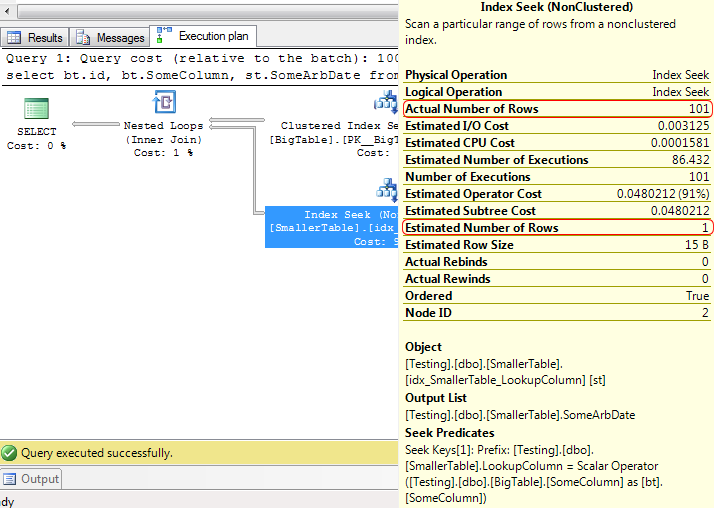
Estimated rows = 1, actual rows = 101. That’s a large discrepancy, but what caused it? It’s not out of date statistics (a usual cause) because the table has only just been created, so why is the estimation so far from the actual.
Let’s take a closer look at that seek. The seek predicate is an equality match on LookupColumn. That can only return 1 row because when the table was populated it was populated with unique values for that column (though the index on that column is not defined unique). So the estimated row count is dead-on, the index seek will return a single row. Now the question is where that 101 for the actual comes from.
This seek is on the inner table of a nested loop join. The way the nested loop join works is to query the outer table of the join and then to query the inner table once for each row returned by the outer table. A look at the details of the clustered index scan that defines the outer table of the nested loop shows that it returns 101 rows.

Since the outer table returns 101 rows, the seek on the inner table must be done 101 times. That’s supported by the execution count shown on the inner seek. That’s where the discrepancy between actual and estimated rows comes from.
When an operator is executed multiple times as part of the query execution, the estimated row count refers to the number of rows that the optimiser estimates will be affected per execution. The actual row count refers to the total number of rows that the operator affected, cumulative over all executions. So when checking to see if there’s a major discrepancy between estimated and actual rows counts, the actual row count has to be divided by the number of executions.
That’s fine when using SQL 2008’s management studio, which exposes the execution count of an operator in the tooltip of that operator. SQL 2005’s management studio did not display the execution count anywhere convenient, though it is present in the XML of the plan. This is purely a feature of the version of Management Studio. The SQL 2008 management studio will display the execution count regardless of whether it’s connected to SQL 2005 or to SQL 2008.
For those still using SQL 2005’s tools, if you want the execution count, this is where to look:
<RelOp AvgRowSize="15" EstimateCPU="0.0001581" EstimateIO="0.003125" EstimateRebinds="85.432" EstimateRewinds="0" EstimateRows="1" LogicalOp="Index Seek" NodeId="2" Parallel="false" PhysicalOp="Index Seek" EstimatedTotalSubtreeCost="0.0480212" TableCardinality="3956">
<OutputList>
<ColumnReference Database="[Testing]" Schema="[dbo]" Table="[SmallerTable]" Alias="[st]" Column="SomeArbDate" />
</OutputList>
<RunTimeInformation>
<RunTimeCountersPerThread Thread="0" ActualRows="101" ActualEndOfScans="101" ActualExecutions="101" />
</RunTimeInformation>
The number of executions, along with the actual row count is contained within the XML node RunTimeInformation. Obviously this node will not be present when looking at an estimated execution plan or an execution plan retrieved from the plan cache, as neither contains any run-time information.
Table creation code.
Edit: In the original post I left 2 indexes out of the table creation, which changed the behaviour of the query completely (hash joins instead of nested loop). If you tried to reproduce my results and couldn’t, you should be able to now with the correct indexes.
Create Table BigTable (
id int identity primary key,
SomeColumn char(4),
Filler char(100)
)

Create Table SmallerTable (
id int identity primary key,
LookupColumn char(4),
SomeArbDate Datetime default getdate()
)

INSERT INTO BigTable (SomeColumn)
SELECT top 250000
char(65+FLOOR(RAND(a.column_id *5645 + b.object_id)*10)) + char(65+FLOOR(RAND(b.column_id *3784 + b.object_id)*12)) +
char(65+FLOOR(RAND(b.column_id *6841 + a.object_id)*12)) + char(65+FLOOR(RAND(a.column_id *7544 + b.object_id)*8))
from master.sys.columns a cross join master.sys.columns b

INSERT INTO SmallerTable (LookupColumn)
SELECT DISTINCT SomeColumn
FROM BigTable TABLESAMPLE (25 PERCENT)
GO

CREATE NONCLUSTERED INDEX [idx_BigTable_SomeColumn]
  ON [dbo].[BigTable] ([SomeColumn] ASC)
GO

CREATE NONCLUSTERED INDEX [idx_SmallerTable_LookupColumn]
  ON [dbo].[SmallerTable] ([LookupColumn] ASC)
  INCLUDE ( [SomeArbDate])
GO
Gideon van Zyl – XE C-Track info/docs 4 SAPS 15:53 24 KB
Excellent point, and one that most people, including me, forget about or fail to mention. Great post.
Gail,
This is great. I got very close to results which you have got in blog post. I have sent you email with screenshots.
Kind Regards,
Pinal
You got different results because I left two indexes out of the table creation code. *embarrassed*
Thanks Gail,
Now my results are same as yours.
So, there is no problem with the example though. Because SQL Server got the 101 correct on the outer TABLE it picked the appropriate plan?
It got the estimates for both the inner and outer tables right.
Outer table, estimated = 101 rows, 1 execution, actual 101 rows. Inner table estimated 1 row, execution count 101, actual rows 101 total for all executions so actual 1 row per execution. Exactly what the estimate was.
Pingback: Bookmarks for September 25th | Brent Ozar - SQL Server DBA
great article Gail. This is something I will look out for going forward. Am I correct in saying the nested loops will more than often create this kind of result?
Nested loops, key/RID lookups, table and index spools.
Nested loops always will show this, unless there’s only one row in the outer table. Key/RID lookups also unless there is only one row that needs the lookup
Thats exactly what we are also experiencing. And such joins are eating up 15-20% of the execution time. Is it normal or is there a work around for it?
What exactly are you seeing and asking about? The post was just explaining how the estimated and actual row counts are displayed, not describing a problem.
Great post. But what are the reasons for and effects of a major discrepancy between estimated and actual execution counts?
Incorrect cardinality estimations from stale or missing stats, non-SARGable predicates or similar. Effects, same as any other cardinality mis-estimate, a plan that may not be efficient for the rows affected
Thanks for your reply. I’ve also seen some execution plans showing clustered index seek on a table with the ratio of actual(~150k)/estimated(~9) row. I guess the reason behind this horrible ratio is the same as in your previous answer, but the table only has 5 rows 😐 Where do the ‘surplus’ records come from?
Stale statistics, the effects of multiple executions (what this post was about)
Every Helpful Thanks a lot
Pingback: Query plan analysis first steps | Paul S. Randal
Hi Gail,
Could you please explain how it will behave in index Scan ?
I run your query for bt.id between 5000 and 5200. I got index scan with Actual number of rows and Estiamted number of rows is 5179 with Number of execution is just one.
Different query, different plan, different behaviour. Probably a hash or merge join, those don’t require the operators against the inner table to run multiple times.
so, the moral of the story is estimated rows can be way off from the actual rows but that is not bad always,(only in case of nested loop join)
No, that’s not the moral of the story. Any time there’s a large difference between the number of rows estimated and the number of rows that were actually processed, there’s potentially a problem.
You just have to be aware that estimated rows are per execution and the actual rows are total for all executions, so be sure you’re comparing oranges with oranges, not oranges with orange slices.
Great Explanation Gail. Thanks a lot !!