And to wrap up the miniseries on IN, EXISTS and JOIN, a look at NOT EXISTS and LEFT OUTER JOIN for finding non-matching rows.
For previous parts, see
I’m looking at NOT EXISTS and LEFT OUTER JOIN, as opposed to NOT IN and LEFT OUTER JOIN, because, as shown in the previous part of this series, NOT IN behaves badly in the presence of NULLs. Specifically, if there are any NULLs in the result set, NOT IN returns 0 matches.
The LEFT OUTER JOIN, like the NOT EXISTS can handle NULLs in the second result set without automatically returning no matches. It behaves the same regardless of whether the join columns are nullable or not. Seeing as NULL does not equal anything, any rows in the second result set that have NULL for the join column are eliminated by the join and have no further effect on the query.
It is important, when using the LEFT OUTER JOIN … IS NULL, to carefully pick the column used for the IS NULL check. It should either be a non-nullable column (the primary key is a somewhat classical choice) or the join column (as nulls in that will be eliminated by the join)
Onto the tests
The usual test tables…
CREATE TABLE BigTable (
id INT IDENTITY PRIMARY KEY,
SomeColumn char(4) NOT NULL,
Filler CHAR(100)
)

CREATE TABLE SmallerTable (
id INT IDENTITY PRIMARY KEY,
LookupColumn char(4) NOT NULL,
SomeArbDate Datetime default getdate()
)

INSERT INTO BigTable (SomeColumn)
SELECT top 250000
char(65+FLOOR(RAND(a.column_id *5645 + b.object_id)*10)) + char(65+FLOOR(RAND(b.column_id *3784 + b.object_id)*12)) +
char(65+FLOOR(RAND(b.column_id *6841 + a.object_id)*12)) + char(65+FLOOR(RAND(a.column_id *7544 + b.object_id)*8))
from master.sys.columns a cross join master.sys.columns b

INSERT INTO SmallerTable (LookupColumn)
SELECT DISTINCT SomeColumn
FROM BigTable TABLESAMPLE (25 PERCENT)
-- (3918 row(s) affected)
First without indexes
-- Query 1
SELECT BigTable.ID, SomeColumn
	FROM BigTable LEFT OUTER JOIN SmallerTable ON BigTable.SomeColumn = SmallerTable.LookupColumn
	WHERE LookupColumn IS NULL

-- Query 2
SELECT ID, SomeColumn FROM BigTable
WHERE NOT EXISTS (SELECT LookupColumn FROM SmallerTable WHERE SmallerTable.LookupColumn = BigTable.SomeColumn)
Let’s take a look at the execution plans
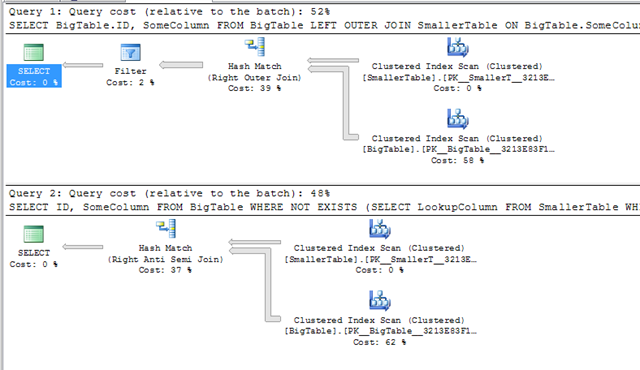
The plans are almost the same. There’s an extra filter in the JOIN and the logical join types are different. Why the different joins?
If we look at the execution plan for the NOT EXISTS, the join type is Right Anti-Semi join (a bit of a mouthful). This is a special join type used by the NOT EXISTS and NOT IN and it’s the opposite of the semi-join that I discussed back when I looked at IN and INNER JOIN
An anti-semi join is a partial join. It does not actually join rows in from the second table, it simply checks for, in this case, the absence of matches. That’s why it’s an anti-semi join. A semi-join checks for matches, an anti-semi join does the opposite and checks for the absence of matches.
The extra filter in the LEFT OUTER JOIN query is because the join in that execution plan is a complete right join, i.e. it’s returned matching rows (and possibly duplicates) from the second table. The filter operator is doing the IS NULL filter.
That’s the major difference between these two. When using the LEFT OUTER JOIN … IS NULL technique, SQL can’t tell that you’re only doing a check for nonexistance. Optimiser’s not smart enough (yet). Hence it does the complete join and then filters. The NOT EXISTS filters as part of the join.
Technical discussion done, now how did they actually perform?
— Query 1: LEFT OUTER JOIN
Table ‘Worktable’. Scan count 0, logical reads 0, physical reads 0.
Table ‘BigTable’. Scan count 1, logical reads 3639, physical reads 0.
Table ‘SmallerTable’. Scan count 1, logical reads 15, physical reads 0.SQL Server Execution Times:
CPU time = 157 ms, elapsed time = 486 ms.— Query 2: NOT EXISTS
Table ‘Worktable’. Scan count 0, logical reads 0, physical reads 0.
Table ‘BigTable’. Scan count 1, logical reads 3639, physical reads 0.
Table ‘SmallerTable’. Scan count 1, logical reads 15, physical reads 0.SQL Server Execution Times:
CPU time = 156 ms, elapsed time = 358 ms.
Can’t make a big deal out of that.
Now, index on the join columns
CREATE INDEX idx_BigTable_SomeColumn
ON BigTable (SomeColumn)

CREATE INDEX idx_SmallerTable_LookupColumn
ON SmallerTable (LookupColumn)
and the same queries
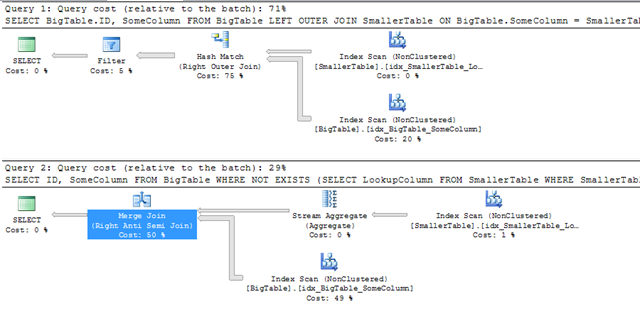
With indexes added, the execution plans are even more different. The LEFT OUTER JOIN is still doing the complete outer join with a filter afterwards. It’s interesting to note that it’s still a hash join, even though both inputs are sorted in the order of the join keys.
The Not Exists now has a stream aggregate (because duplicate values are irrelevant for an EXISTS/NOT EXISTS) and an anti-semi join. The join here is no longer hash, it’s now a merge join.
This echoes what I found when looking at IN vs Inner join. When the columns were indexed, the inner join still went for a hash join but the IN changed to a merge join. At the time, I thought it to be a fluke, I’m not so sure any longer. More tests on this are required…
The costing of the plans indicates that the optimiser believes that the LEFT OUTER JOIN form is more expensive. Do the execution stats carry the same conclusion?
— Query 1: LEFT OUTER JOIN
Table ‘Worktable’. Scan count 0, logical reads 0, physical reads 0.
Table ‘BigTable’. Scan count 1, logical reads 342, physical reads 0.
Table ‘SmallerTable’. Scan count 1, logical reads 8, physical reads 0.SQL Server Execution Times:
CPU time = 172 ms, elapsed time = 686 ms.— Query 2: NOT EXISTS
Table ‘BigTable’. Scan count 1, logical reads 342, physical reads 0.
Table ‘SmallerTable’. Scan count 1, logical reads 8, physical reads 0.SQL Server Execution Times:
CPU time = 78 ms, elapsed time = 388 ms.
Well, yes, they do.
The reads (ignoring the existence of the worktable for the hash join) are the same. That’s to be expected, both queries executed with a single scan of each index.
The CPU time figures are not. The CPU time of the LEFT OUTER JOIN form is almost twice that of the NOT EXISTS.
In conclusion…
If you need to find rows that don’t have a match in a second table, and the columns are nullable, use NOT EXISTS. If you need to find rows that don’t have a match in a second table, and the columns are not nullable, use NOT EXISTS or NOT IN.
The LEFT OUTER JOIN … IS NULL method is slower when the columns are indexed and it’s perhaps not as clear what’s happening. It’s reasonably clear what a NOT EXISTS predicate does, with LEFT OUTER JOIN it’s not immediately clear that it’s a check for non-matching rows, especially if there are several where clause predicates.
I think that’s about that for this series. I’m going to do one more post summarising all the findings, probably in a week or two.
Hi,
Though not conclusive, I got slightly different results when tested on SQL 2005. With no indexes I got a parallel plan for Left outer with the following IO and time stats.
For Left outer:
Table ‘SmallerTable’. Scan count 3, logical reads 40, physical reads 1, read-ahead reads 13, lob logical reads 0, lob physical reads 0, lob read-ahead reads 0.
Table ‘BigTable’. Scan count 3, logical reads 3992, physical reads 7, read-ahead reads 3631, lob logical reads 0, lob physical reads 0, lob read-ahead reads 0.
Table ‘Worktable’. Scan count 0, logical reads 0, physical reads 0, read-ahead reads 0, lob logical reads 0, lob physical reads 0, lob read-ahead reads 0.
Time stats:
CPU time = 592 ms, elapsed time = 751 ms.
For Not exists
Table ‘Worktable’. Scan count 0, logical reads 0, physical reads 0, read-ahead reads 0, lob logical reads 0, lob physical reads 0, lob read-ahead reads 0.
Table ‘BigTable’. Scan count 1, logical reads 3639, physical reads 3, read-ahead reads 3635, lob logical reads 0, lob physical reads 0, lob read-ahead reads 0.
Table ‘SmallerTable’. Scan count 1, logical reads 15, physical reads 1, read-ahead reads 13, lob logical reads 0, lob physical reads 0, lob read-ahead reads 0.
Time stats :
CPU time = 500 ms, elapsed time = 746 ms.
I found the results marginally favoring Not exists, on scan count and logical reads, when I had a parallel plan. But, when parallel plans where turned off the results where similar to your results.
I set server-wide maxdop 1 before running these tests. I always do. Parallelism confuses the issue and makes it difficult to draw meaningful conclusions.
I’ll compare parallel plans with parallel plans and serial with serial, but comparing parallel with serial means that one query has the parallel overheads that the other doesn’t.
Hi,
Makes sense and thanks for the reply.
Regards,
Raj
Create an UNIQUE INDEX on LookupColumn on lookup table so that the optimizer can figure out there are no duplicates in the output of the join. Now you are using DISTINCT to populate it but do not hint the optimizer about its contents.
Doing that changes the join in the LEFT OUTER JOIN to merge from hash, it’s still an outer join with secondary filter (where the NOT EXISTS is an anti-semi join), and the exists still shows lower duration and CPU, though not as significant as with the non-unique index.
Pingback: What’s faster: NOT EXISTS or LEFT OUTER JOIN? » SQL Server and Beyond
Hi Gail, hope you don’t mind but I enjoyed reading your post and recommended it on my own blog: http://sqlserverandbeyond.com. Hope that’s OK.
This sample is way too simplistic to make a blanket statement such as the first paragraph in the conclusion. I’ve run into many instances in real life where the LEFT OUTER JOIN method performed several orders of magnitude faster than the NOT EXISTS method.
If you really want to know which method will be faster in your specific case, then test both and see which is actually faster. They are both similar tools in the toolbox and some jobs call for one while some call for the other.
Amazingly useful post (yet again)!
Just a thought, do these posts still have the same result when used in SQL 2012?
Test it and let us know?
All the code to create the tables and populate them is in the first part and all the testing code is given.
No problem. Got round to installing SQL2012 and running your code. Findings agree with your observations:
Thanks again.
Like Tom H said, sometimes things don’t work out that way. I just ran into a case where NOT EXISTS performed an order of magnitude worse than the LEFT JOIN / NOT NULL method. Notably my case involved a compound primary key on the NOT EXISTS table, and that key matched two other tables. The NOT EXISTS method forced the other two tables to be joined too early in the plan.
where not exists (Select top 1 ‘s’ from SomeTable st where st.lookup = base.lookup)
Top 1 is not necessary in an EXISTS. It’s ignored completely.
I have an experience where the DW guys had a Job running for 9 hours with a not exists.
I changed it to a left join where null and it took 16 seconds from that day onwards.
So the question is, is the principle laid out here one that scales well when dealing with billion row tables? Are there specific principles to follow which depend on size of data involved in the query?
It should, but there can be other factors, not including statistics estimations, join types, etc, etc, etc.
Test, compare, if there are major differences (there shouldn’t be), see if you can figure out why.
Pingback: LINQ Not In: Excluding SQL Records in ASP.NET - Sensible Dev