So, it’s the second Tuesday of the month again, and it’s time for T-SQL Tuesday again.  This month it’s hosted by Sankar Reddy and the topic is “Misconceptions in SQL Server”
I thought I’d tackle a trio of table variable myths and partial truths.
Table Variables are memory-only
This one is pervasive and irritating. It typically goes like this:
You should use table variables rather than temp tables because table variables are memory only.
This myth can be broken down into two parts:
- That table variables are not part of TempDB
- That table variables are not written to disk
The first is easy to prove and has been done repeatedly. I’m not doing it again. I’m going to tackle the second portion only.
See, one could argue that, even though the table variable is created in the TempDB system tables and allocated pages within the TempDB data file, it is still kept entirely and only in memory. Let’s see if that’s true…
DECLARE @LargeTable TABLE (
id INT IDENTITY PRIMARY KEY,
LargeStringColumn1 CHAR(100),
LargeStringColumn2 CHAR(100)
)

INSERT INTO @LargeTable (LargeStringColumn1, LargeStringColumn2)
SELECT TOP (100000) 'Table Variable Test','T-SQL Tuesday!'
FROM master.sys.columns a CROSS JOIN master.sys.columns b

WAITFOR DELAY '00:01:00' -- so that the table var doesn't go out of scope and get deallocated too quickly.
This is not a massively large table. 100000 rows at 204 bytes per row (excluding header). A query of sys.dm_db_index_physical_stats (which does work on temp tables and table variables) reveals a total page count of 2632. That’s a grand total of 20.6 MB. 20 Megabytes. The SQL instance I’m running this on is allowed to use up to 2 GB of memory. No way on earth is this table variable going to cause any form of memory pressure (and I promise there is nothing else running)
So, run that code and, while that waitfor is running, do something that should never be done to a SQL server that you care anything about.
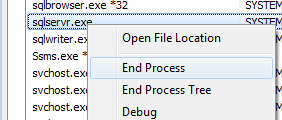
That’s going to kill SQL so fast that it’s not going to have a chance to clean up or deallocate anything on the way out. Just how I want it.
Now load up my favourite hex editor and open the TempDB data file and see if any rows from the table variable are there.
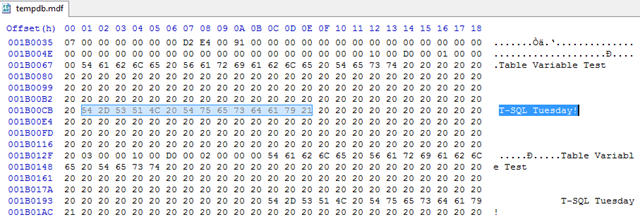
That pretty much speaks for itself. This myth, clearly false.
Table Variables cannot be indexed
Not too common, but I have seen this one floating around. It typically goes something like this:
Table variables cannot have indexes created on them. The only exception is a clustered index defined as part of the primary key.
Now there’s a small grain of truth in this. Both of the following return an error
DECLARE @SomeTable TABLE (
ID int,
SomeColumn VARCHAR(20)
)
ALTER TABLE @SomeTable ADD CONSTRAINT pk_SomeTable PRIMARY KEY CLUSTERED (id)
DECLARE @SomeTable TABLE (
ID int,
SomeColumn VARCHAR(20)
)
CREATE INDEX idx_Testing ON @SomeTable (SomeColumn)
Msg 102, Level 15, State 1, Line 5
Incorrect syntax near ‘@SomeTable’.
Ok, so it’s not possible to run a CREATE INDEX or ALTER TABLE statement against a table variable, but does that mean that it’s limited to a single clustered index (defined as part of the primary key?)
It does not.
Firstly, there’s no requirement that the primary key be enforced by a clustered index. The following is perfectly valid.
DECLARE @Test TABLE (
ID INT NOT NULL PRIMARY KEY NONCLUSTERED,
SomeCol VARCHAR(20)
)
A query against TempDB’s system tables with that table declared clearly shows two entries in sys.indexes for that table variable, index id 0 (the heap) and a single non-clustered index with an auto-generated name indicating that it is enforcing the primary key
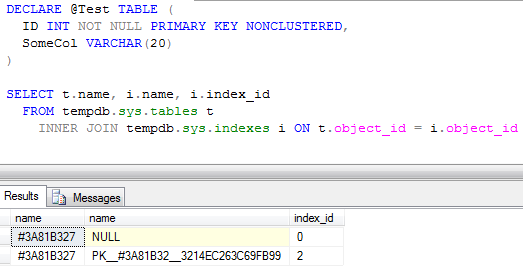
So does that mean that we can have one and only one index on a table variable?
Again, no.
We’re limited to creating any desired indexes as part of the table’s definition, but there are two constructs that can be defined that way. Primary key and unique constraints. We can define as many unique constraints as desired on a table variable (up to the limit of number of indexes on tables). If the columns that need to be indexed aren’t unique themselves, we can always add the primary key column(s) to the unique constraint so that the combination is always unique.
DECLARE @Test TABLE (
ID INT NOT NULL PRIMARY KEY,
IndexableColumn1 INT,
IndexableColumn2 DATETIME,
IndexableColumn3 VARCHAR(10),
UNIQUE (IndexableColumn1,ID),
UNIQUE (IndexableColumn2,ID),
UNIQUE (IndexableColumn3, IndexableColumn2, ID)
)

INSERT INTO @Test (ID, IndexableColumn1, IndexableColumn2, IndexableColumn3)
VALUES
(1,0,GETDATE(),'abc'),
(2,0,'2010/05/25','zzz'),
(3,1,GETDATE(),'zzz')

SELECT t.name, i.name, i.index_id
FROM tempdb.sys.tables t
INNER JOIN tempdb.sys.indexes i ON t.object_id = i.object_id
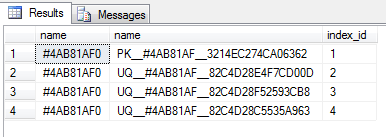
If the primary key is enforced by the clustered index, this does not make the index any wider than it would be were it defined as a non-unique index with Create Index, as a non-unique non-clustered index always gets the clustering key added to the key columns.
I think that’s this myth suitably busted.
Changes to Table Variables are not logged
A fairly uncommon myth, but I have seen this a time or two, so I thought I’d tackle it as my third.
Table variables don’t participate in transactions, hence nothing is written to the transaction log when changes are made to them.
This again has two parts to it
- Table variables don’t participate in transactions
- Operations on table variables are not logged
The first part is completely true. Table variables do not participate in user transactions and they are not affected by an explicit rollback. Easily demonstrated.
DECLARE @TransactionTest TABLE (
ID INT IDENTITY PRIMARY KEY,
SomeCol VARCHAR(20)
)

INSERT INTO @TransactionTest (SomeCol) VALUES ('Row1')
INSERT INTO @TransactionTest (SomeCol) VALUES ('Row2')

BEGIN TRANSACTION
INSERT INTO @TransactionTest (SomeCol) VALUES ('Row3')
ROLLBACK TRANSACTION

SELECT * FROM @TransactionTest
That final select returns 3 rows, not the two that might be expected. The rollback did not affect the table variable.
So does that lack of participation imply that there is no logging? Well, no. My university logic text would call this a Non sequitur fallacy (conclusion does not follow from its premises). The fact that explicit rollbacks don’t affect table variables in no way implies that there’s no logging happening. Let’s have a look into the transaction log to prove it.
USE tempdb -- make sure that the correct database is in use
GO
CHECKPOINT –- To truncate the log and indicate the start of the test

DECLARE @TransactionTest TABLE (
ID INT,
SomeCol VARCHAR(20)
)

SELECT name AS TableVariableActualName FROM tempdb.sys.tables

INSERT INTO @TransactionTest (ID, SomeCol)
VALUES
(0,'Row1'),
(1,'Row2'),
(2,'Row3')

SELECT Operation, AllocUnitName, [Begin Time], [End Time] FROM fn_dblog(NULL, NULL)
GO
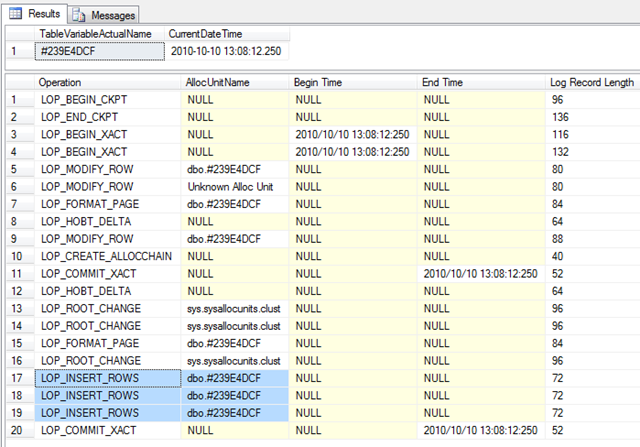
The alloc unit name matches the table variable’s name as defined in the system tables, the times for the begin and end transaction matched. I don’t think there’s any arguing that the changes to the table variable are logged.
The next interesting question is whether there’s more or less logging than for a temp table, more or less logging than for a permanent table. Only one way to find out.
I’m going to run exactly the same code with the table variable replaced by a temp table (same structure) and then I’m going to create a new user database and run exactly the same code just using a permanent table.
First the temp table.
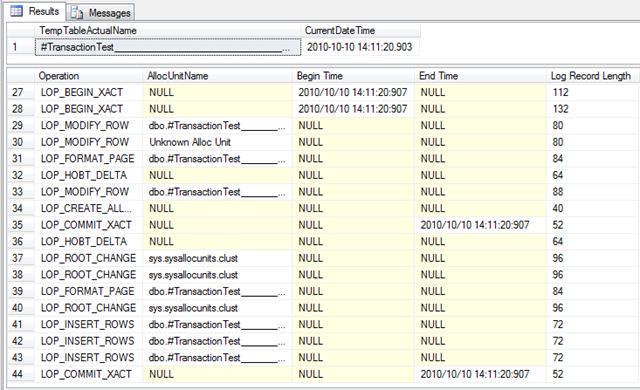
And now the permanent table in a user database
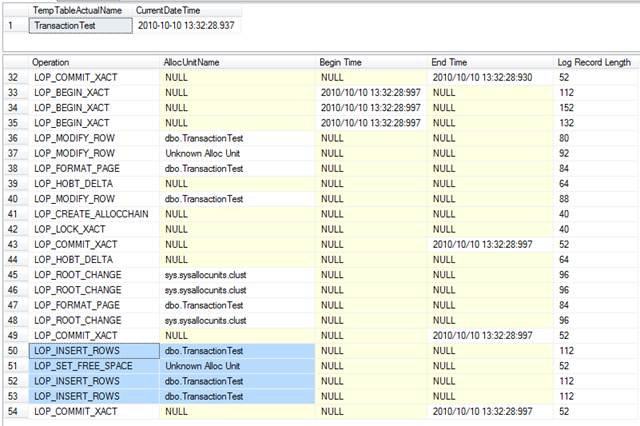
From that it appears that the table variable logs less than the temp table which logs less than the user table, however the table variable does still has some logging done.
‘But why?’ I hear people asking. After all, TempDB doesn’t log redo information and, since table variables don’t participate in transactions there’s no need to log undo information. So why log at all?
Because an explicit rollback (ROLLBACK TRANSACTION) is not the only time that changes to a table will have to be undone. Consider this one.
DECLARE @TransactionTest TABLE (
ID INT PRIMARY KEY,
SomeCol VARCHAR(20)
)

INSERT INTO @TransactionTest (ID, SomeCol)
VALUES
(0,'Row1'),
(1,'Row2'),
(1,'Row3')
That third row will fail with a primary key violation. If the table variable didn’t log at all, SQL would have no way of undoing the inserts of the first two rows when the third one fails. That’s not permitted, an insert is an atomic operation, it cannot partially succeed. Hence changes to a table variable must be logged sufficiently to allow SQL to generate the undo operations in cases like this. A glance over the transaction log shows in detail what happened
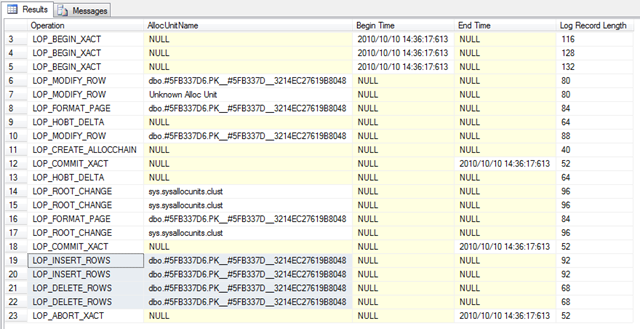
Two rows inserted, followed by two rows deleted, as SQL generated operations to undo the insert statement, followed by an abort transaction.
I think that’s enough on this. As for the myth that changes to table variables aren’t logged, I believe that’s sufficiently disproven by this point.
In Conclusion
Table Variables are memory-only: False
Table Variables cannot be indexed: False
Changes to Table Variables are not logged: False
Hi Gail,
There seems to be a theme issue with trackbacks, can you please leave a comment on the blog with a link to this post please?
Nice post Gail!!
Excellent. The only thing that I would consider adding is in the “You should use table variables rather than temp tables because table variables are memory only.” part… the implication is that temp tables are NOT memory only. In http://support.microsoft.com/default.aspx?scid=kb;en-us;305977&Product=sql2k (section Q4), we see “A table variable is not a memory-only structure. Because a table variable might hold more data than can fit in memory, it has to have a place on disk to store data. Table variables are created in the tempdb database similar to temporary tables. If memory is available, both table variables and temporary tables are created and processed while in memory (data cache).” So, a temp table CAN be memory only also!
Wayne: Well…. There was plenty of memory available for that tiny little table variable I proved was in the data file…
Slightly harder to prove that it’s not in the data file but is in memory. Would ideally need a debugger attached to SQL to read the data cache, then a read of the tempDB data file on disk. (unless there’s a memory DMV I’m not familiar with that can list pages in the data cache. Probably is)
Nice…well done.
if you do not have access to “Create table” even #table you are still allowed to declare a temp table and SQL creates it in the background for you?
You don’t need create table permissions for either temp tables or table variables.
Despite the naming of one as a variable, they are both tables in the full sense of the word – defined in the system tables, space allocated in the file, changes in the transaction log.
Absolutely awesome, Gail. You can’t ask for a more straight forward set of examples nor a clearer narrative. Very well done and spot on.
Nice post.
I think a nice way to see the effect on tempdb is this:
USE [tempdb];
DBCC SHRINKDATABASE(N’tempdb’ );
EXEC [sp_spaceused];
USE [test]; — <== Change to A.N.Other database which exists on your system
DECLARE @LargeTable TABLE (
[id] INT IDENTITY PRIMARY KEY,
[LargeStringColumn1] CHAR(100),
[LargeStringColumn2] CHAR(100)
);
INSERT INTO @LargeTable ([LargeStringColumn1], [LargeStringColumn2])
SELECT TOP (100000) 'Table Variable Test','T-SQL Tuesday!'
FROM [master].[sys].[columns] AS [a] CROSS JOIN [master].[sys].[columns] AS [b];
USE [tempdb];
EXEC sp_spaceused;
GO
Which will clearly show the growth in tempdb:
Size before use of table variable :
database_name database_size unallocated space
tempdb 8.50 MB 6.69 MB
And after use of table variable :
database_name database_size unallocated space
tempdb 33.00 MB 5.99 MB
On the plus side, we have the CTE to help – using this in place of the temp table (requirements permitting) does seem to avoid tempdb:
USE [tempdb];
DBCC SHRINKDATABASE(N'tempdb' );
EXEC [sp_spaceused];
USE [test]; — <== Change to A.N.Other database which exists on your system
;WITH LargeTable ([LargeStringColumn1] ,[LargeStringColumn2] )
AS
(
SELECT TOP (100000) 'CTE Test','T-SQL Tuesday!'
FROM [master].[sys].[columns] AS [a] CROSS JOIN [master].[sys].[columns] AS [b]
)
SELECT [LargeStringColumn1],[LargeStringColumn2]
FROM [LargeTable] ;
USE [tempdb];
EXEC sp_spaceused;
Here you will see no change in the size of tempdb at all.
Just note that you’re not supposed to shrink TempDB while it’s in use as it can result in corruption. There is a kb article on this, I forget its number.
Indeed, just as killing the process is quite risky 😉
Killing the process isn’t actually risky. I exaggerated.
It’s no worse (and in fact not even as bad) as a hard server shutdown. Providing all the files are intact afterwards, SQL will start up without a problem, doing crash-recovery on all databases.
Table variables do have some characteristics that is different from temporary tables, which may affect performance negative.
1) Query Optimizer always think table variables hold one and one record only no matter what. Because there is no statistics on table variables as there is on temporary tables.
2) Table variables doesn’t support parallellism for INSERT, DELETE and UPDATE, only SELECT. Temporary tables support parallellism in all cases.
Actually, (1) is a myth too. There are no stats on table variables, but if a query is recompiled after a table var is populated, the estimate will be > 1 (based on the storage engine’s knowledge of the total row count in the table)
What that means for performance, well, it depends.
Pingback: T-SQL Tuesday #11 Round up, Misconceptions in SQL Server | Sankar Reddy, SQL Server Developer/DBA
Fantastic Post
Cheers,
Venkatesan Prabu .J
Good work.You will post lot of items.
Excellent post. Good work Gail.
I never knew that forcing a recompile would result in an accurate estimated number of rows for a table variable – another myth (which I believed to be true) debunked!!
It’s not accurate by any means. There are still no statistics so the only thing the optimiser has to go on is the total row count in the table that comes from the storage engine.
It’s not estimating one row, it can still be widely inaccurate.
hmm – could you explain a bit more on the inaccurate part.
I did some amount of (simplistic) testing and found that the actual number of rows in the plan after a recompile accurately matches the total number of rows in the table variable (and I’m assuming the cardinality would always be accurate).
I’ve attached the sample script below:
IF OBJECT_ID(‘dbo.TestTab’) IS NOT NULL
DROP TABLE dbo.TestTab;
GO
IF OBJECT_ID(‘dbo.NoRecompileProc’) IS NOT NULL
DROP PROCEDURE dbo.NoRecompileProc;
IF OBJECT_ID(‘dbo.RecompileProc’) IS NOT NULL
DROP PROCEDURE dbo.RecompileProc;
GO
CREATE TABLE dbo.TestTab(RowPK int IDENTITY(1,1) NOT NULL PRIMARY KEY CLUSTERED,Name nvarchar(100) NOT NULL,number int NOT NULL);
INSERT dbo.TestTab(Name,number)
SELECT ISNULL(T1.name,’**’)+CAST(ROW_NUMBER() OVER (ORDER BY T1.number) as varchar(30)),T2.number
FROM (SELECT TOP 300 * FROM master.dbo.spt_values) T1 CROSS JOIN
(SELECT TOP 1000 * FROM master.dbo.spt_values) T2
GO
CREATE PROCEDURE dbo.RecompileProc @LowerLimit int, @UpperLimit int
AS
BEGIN
DECLARE @Tab TABLE(RowPK int NOT NULL, Name nvarchar(100) NOT NULL, number int NOT NULL);
INSERT @Tab(RowPK,Name,number)
SELECT RowPK,Name,number FROM dbo.TestTab
WHERE RowPK BETWEEN @LowerLimit AND @UpperLimit;
SELECT * FROM @Tab OPTION (RECOMPILE);
SELECT T1.RowPK,T2.RowPK FROM @Tab T1 INNER JOIN dbo.TestTab T2 ON
T1.RowPK = T2.RowPK
OPTION (RECOMPILE)
END
GO
CREATE PROCEDURE dbo.NoRecompileProc @LowerLimit int, @UpperLimit int
AS
BEGIN
DECLARE @Tab TABLE(RowPK int NOT NULL, Name nvarchar(100) NOT NULL, number int NOT NULL);
INSERT @Tab(RowPK,Name,number)
SELECT RowPK,Name,number FROM dbo.TestTab
WHERE RowPK BETWEEN @LowerLimit AND @UpperLimit;
SELECT * FROM @Tab;
SELECT T1.RowPK,T2.RowPK FROM @Tab T1 INNER JOIN dbo.TestTab T2 ON
T1.RowPK = T2.RowPK
END
GO
— same netsted loop join – even if the no recompile proc still estimates only 1 row
EXEC dbo.RecompileProc 100,900
EXEC dbo.NoRecompileProc 100,900
— data tips the recompiled plan to hash join with better estimates
— non recompiled plan still in nested loop
EXEC dbo.RecompileProc 1000,90000
EXEC dbo.NoRecompileProc 1000,90000
Do a filtered query and check the estimates.
The optimiser knows accurately the total rows in the table variable. As I said, it gets that from the storage engine. However it still has no idea what the data distribution looks like. Hence it cannot accurately estimate the number of rows affected if you’re filtering the table variable (ie a query that does not simply SELECT * FROM @TableVar)
Tried that out and what you said is spot on – good stuff to learn and thanks for the explanation.
Pingback: T-SQL-ohjelmointi » Blog Archive » ROLLBACK taulumuuttujaan ei toimi
Fantastic post, as always. 🙂
Great topic!! Lately I was struggling at the fact I didn’t know the existance of any rollback proof struct to save error handling data whitout having to ‘fake the transaction so it wouldn’t do real changes but just check out what would happen (using temp tables)’ or ‘not using a transaction at all and restoring my tables to a priorly saved status so I could have the info of the things that would happen’. Both of them suck coz the first is time and resources consuming and after you have found out there would be no problems for it to run, you just have to run it again for real. The second is even more time and resources consuming, coz if it didn’t get the way you wanted it to, you have to restore your tables to a prior state (saving the prior state and restoring it take their time and resources).
I used to see it as a time travel problem, rollback rolles the time back as if it wouldn’t have happened. What I needed was the power to go back to a point of time with the knowledge of what has happened after it, so I could prevent the actions from happening, but also giving the user a chance to know which particular sets of steps where the ones to fail.
Thanks, you’re a great asset.
Pingback: Table variable myths - SQLZealot
This post seems to contradict an earlier article written that states “Are not persisted to disk unless there is memory pressure, or the table is too large to fit in the data cache”
https://www.sqlinthewild.co.za/index.php/2007/12/19/temp-tables-and-table-variables/
Can you explain the difference, and clarify whether temp tables/variables are always written to disk even when RAM is available?
Always, probably not. They can be though.
They won’t be removed from memory (and hence have to be re-read from disk) unless there’s memory pressure.
Pingback: Temp table myths « Sunday morning T-SQL
Pingback: Memory-optimized Table Variable Gotcha | Ned Otter Blog
Are temp tables/variables are always written to disk even when RAM is available
Just a guess… Gail has shown table variables always get written to pages in tempdb, so the question of if pages holding table variable data go to disk could be the same as for any page in tempdb getting written to disk.
There is memory pressure, the LRU algorithm, delayed durability and checkpoints. If any of these force a page in tempdb to be written to disk, if it happens to contain data for a table variable then it gets written. If none of these conditions apply before a given table variable gets dropped then it won’t have got written to disk.